March 2, 2025
5 tips for scanning receipts
Get clearer scans and better OCR results with these simple tips for lighting, angle, and focus.
Nuestra app de tickets para pequeñas y medianas empresas usa OCR para escanear, organizar y seguir tus recibos.

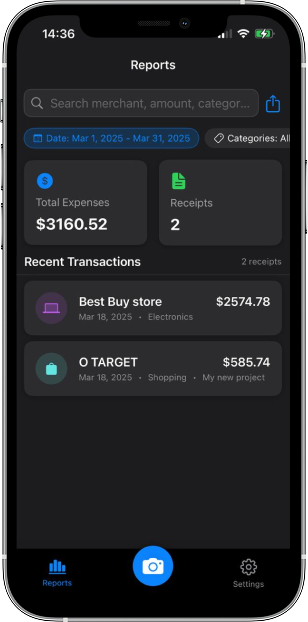
Nuestra app ofrece escaneo y almacenamiento profesional en tu móvil.
Instantly scan receipts with your camera - faster than any dedicated receipt scanner machine.
Track expenses by category, date, or merchant with detailed reports.
Process receipts in seconds with our rapid receipt scanner technology. Auto-categorization to categories and projects and smart field detection eliminates manual data entry.
Store receipts securely in the cloud with the same reliability as dedicated receipt scanner machines, but with the convenience of mobile access.
Download your data in CSV and PDF formats to simplify tax filing.
Más simple que un escáner físico, más potente que otras apps. Del escaneo al informe en pocos pasos.
Use your phone's camera as a rapid receipt scanner to capture any paper receipt in seconds.
Our receipt scanner software extracts all important information using advanced OCR technology.
Automatically organize receipts by category, date, or vendor - more flexible than traditional expense tracking systems.
Generate detailed expense reports and analyze spending patterns similar to Zoho Expense but with a simpler interface.
Lo que dicen los usuarios.
"I've been using this app for a while, and it's been a game-changer for organizing my receipts. The OCR works well, quickly extracting data from printed receipts, and the ability to categorize expenses makes financial tracking much easier. I also love the export feature, which allows me to generate PDFs and CSV files effortlessly. The interface is user-friendly, making it accessible even for non-tech-savvy users. A great tool for managing personal and business expenses! Highly recommended!"
"Easy way of organizing your finance."
Respuestas sobre nuestra app de escaneo de recibos.
Our OCR technology has a high accuracy rate. For best results, ensure good lighting and a clear image when scanning.
Absolutely! You can export your receipt data in various formats including PDF and CSV This makes it easy to share information with your accountant or import into other financial software.
Yes, you can scan and save receipts offline. Basic scanning and data extraction work without an internet connection. Cloud synchronization and some advanced features will require internet connectivity, but your locally stored receipts will automatically sync once you're back online.
Únete a quienes ya usan nuestra app sencilla y potente para escanear recibos.
Disponible para iOS.